Xinje Components in Retrofits and Custom Machines – Selection Criteria for HMI Panels, Inverters and Servo Drives
Selecting Xinje HMI panels, inverters and servo drives for retrofits and custom machines: interfaces, Modbus, EtherCAT and cases where Xinje is not the choice.

Selecting Xinje components – HMI panels, inverters and servo drives – for retrofits and custom machines comes down to four groups of technical criteria: communication interfaces, functional requirements (safety functions included), installation constraints, and programming tools with documentation. Brand and price are secondary: they matter only once a component meets the technical conditions.
Automation Dariusz Kulik has been in business since 2014 as an automation integrator and runs xinje.pl, a Polish-language shop distributing Xinje in Poland. This commercial interest is disclosed, so the article also covers cases in which Xinje is not the right choice. Criteria for choosing a panel alone and a drive alone are in “HMI Panels in Practice – How to Choose an Operator Panel?” and “Servo or VFD? Drive Selection for a Production Machine”; here the focus is on how the components work together (Modbus RTU, Modbus TCP, EtherCAT), the checks made before a choice, and published projects.
Table of contents
Component selection criteria in retrofits and custom machines
In a retrofit the range of choice is set by the existing installation; in a custom machine it is set by the customer’s specification and the project design. In a retrofit the controller, the network, the cut-out in the cabinet door and the motors are given; in a new machine there is more freedom, limited by end-user requirements such as a list of approved brands. Five groups of data (four technical and the end user’s organisational requirements) are checked before a component is chosen:
- interfaces – ports and protocols on both sides of the connection (RS485, Ethernet, EtherCAT, PROFINET, pulse input), not merely the presence of a connector;
- functions resulting from the risk assessment – including drive safety functions, which depend on the variant of a specific model;
- installation and supply – panel cut-out and depth, voltage and number of phases, cables matched to the drive series and the motor;
- programming and documentation – visualisation or drive configuration tool, the possibility of recreating an existing project, the matching manual version;
- organisational requirements of the end user – a single brand, spare parts, service agreements.
HMI panels – ports, cut-out and programming platform
In a retrofit, the suitability of a panel is decided by the number and type of ports and by the mounting cut-out, and only then by the screen size. The shop range of Xinje HMI panels (Polish-language shop) covers, among others, the TS2, TS3 and TS5 series (with the TS5D variant) and the older TG series. According to the shop, the panels have ready-made Modbus RTU (RS485) and Modbus TCP (Ethernet) drivers, so they also work with other manufacturers’ controllers (the manual lists the Siemens S7-1200 and S7-200 Smart). The differences that matter:
- the TS2 has COM1 (RS232) and COM2 (RS485) on a single connector, described in the manual as one serial port; the TS3, TS5 and TS5D have two independent ports, so a controller and an inverter can be connected at once;
- Ethernet is available in the TS2 and TS3 only in the -E versions, and in the TS5 and TS5D in every model (in the TG series, in the -ET versions);
- Wi-Fi, 4G, MQTT, remote VNC view and an IP camera view are available, among the TS panels, only in the TS5 and TS5D;
- all TS panels have a four-wire resistive screen, not a capacitive one.
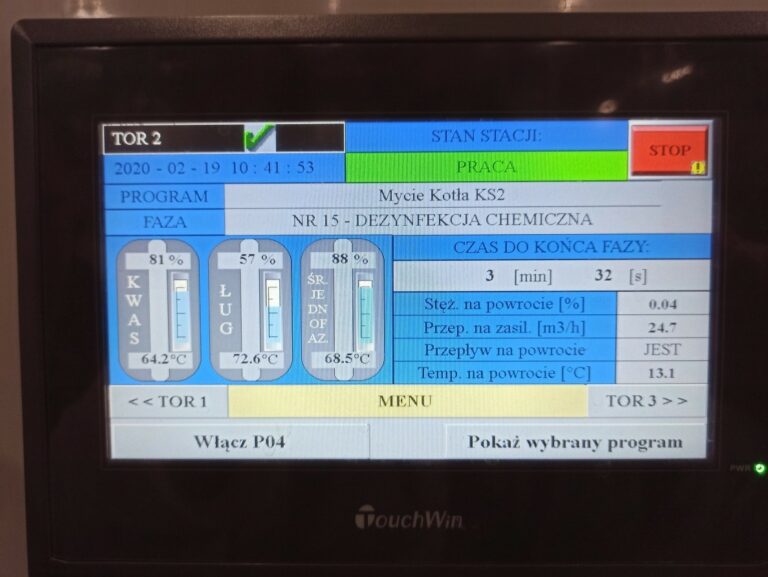
The mounting cut-out has to be compared with the dimensional drawing, because an equal screen size does not mean an identical opening: the shop’s table of equivalents describes a 10.1″ panel from another manufacturer whose opening is about 22 mm taller than that of the 10.1″ TS panels, which requires a frame or modification. A visualisation is not transferred automatically either: TS panels are programmed in TouchWin Pro, TG panels in the older TouchWin, and screens from other manufacturers’ panels have to be recreated. According to the manufacturer the TS series covers TG functions, so in a new project the TG is chosen mainly to replace a TG panel with an existing project or when a screen size or version not available in the TS is needed; the CIP station and the semi-automatic machine described below were also built with TG panels. Services in this area: HMI panels and PLC controllers.
VH1 and VH6 inverters – supply, control and communication
An inverter is matched to the rated current and power from the motor nameplate and to the supply network, and only then to the control method and communication. The Xinje VH1 and VH6 inverters differ in supply and functions. In the shop range the VH1 comes in 1×230 V (0.4–2.2 kW) and 3×400 V (0.4–15 kW) versions, works in U/f and sensorless vector (SVC) modes, has an RS485 port with Modbus RTU, and the version marked -B has a braking chopper. The VH6 is a 3×400 V-only design (3.7–45 kW) and additionally offers closed-loop vector control with an encoder (FVC, with an encoder card) as well as EtherCAT, CANopen and I/O cards; RS485 is available in its versions with a communication card.
U/f is enough for pumps and fans, SVC gives higher torque at low speed, and FVC accurate speed and full torque from zero. A PLC controls the inverter over Modbus RTU on RS485 (a single cable sets the frequency and reads the drive status) or through digital and analogue inputs. Because only the VH1 runs from a single-phase supply and EtherCAT and CANopen require the VH6, the choice of series is sometimes settled by the supply and the fieldbus rather than by power. The split between inverter and servo drive is covered in the drive selection article mentioned above.
DS5 servo drives and MS6 motors – control interface, designation and variants
The type of control interface determines the DS5 drive variant, so selection starts from what the controller can do, not from power. The shop range of DS5 servo drives and MS6 motors includes: the DS5L2 – a pulse input (pulse and direction, A/B, CW/CCW) up to 500 kpps with a differential signal and up to 200 kpps with a 24 V open-collector signal, with RS485 Modbus; the DS5K2 – pulses and a ±10 V analogue input; the DS5C2 – EtherCAT (CoE, CiA 402); and the DS5P – PROFINET. According to the shop, the series 1 drives (DS5C1, DS5L1, DS5K1) are being phased out, so new projects are planned on series 2.
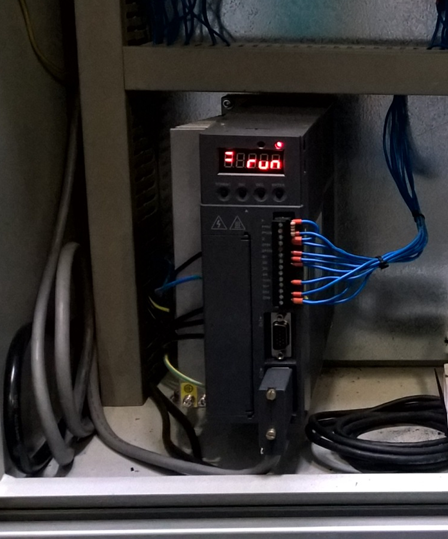
In the designation DS5C2-20P7-PTA-FS the letter C stands for EtherCAT (L for the pulse variant), the digit 2 for series 2, 20P7 for 220 V and 0.75 kW, and the suffix -FS for the variant with the STO function; a drive without this suffix has no STO; the meaning of the PTA part is not explained in the manufacturer’s documentation and is not interpreted here. MS6 motors are described by inertia (S – low, G – medium, H – high), flange size, encoder type and the presence of a brake (letter Z). A multi-turn absolute encoder is a motor option, and retaining position after power-off requires a battery in the encoder cable; with an incremental encoder the axis needs homing after switch-on.
Mechanical selection is based on the torque required on the axis (T = 9550·P/n, with P in kW and n in rpm), the peak torque during acceleration, and the load-to-rotor inertia ratio, whose limit according to the catalogue is from 10 to 30 times depending on the motor (in practice much lower values are used for dynamic axes, as described in the drive selection article). Vertical axes usually require a motor with a brake (or a self-locking mechanism), and frequent braking calls for a braking resistor. Each set includes two cables, one for power and one for the encoder, matched to the drive series, flange size and brake version.
Interworking of components – Modbus RTU, Modbus TCP and EtherCAT
In a typical system the panel talks to the controller over Ethernet (Modbus TCP) or RS485 (Modbus RTU), and the controller talks to the drives over EtherCAT, pulses or Modbus RTU. The shop’s diagram shows the same hierarchy; in practice the medium follows from what the controller and the drive provide.
| Link | Medium and protocol | Condition on the component side |
|---|---|---|
| HMI panel – PLC | Modbus TCP (Ethernet) or Modbus RTU (RS485) | RJ45: TS5 and TS5D in every model, TS2 and TS3 in -E versions, TG in -ET versions; all TS panels have RS485 |
| PLC – inverter | Modbus RTU (RS485), wired I/O, EtherCAT | RS485 in the VH1, and in the VH6 in versions with a communication card; EtherCAT only in the VH6 with a card |
| PLC – servo drive | pulses, EtherCAT, PROFINET | pulses: DS5L2 and DS5K2; EtherCAT: DS5C2; PROFINET: DS5P |
In an EtherCAT network the checks include the device description file (ESI) in the controller’s programming environment, the topology, the number of axes (according to the shop, a DS5C2 network supports up to 64 axes, depending on the controller: the XDH 16, 32 or 64 axes, the XLH 16–32 axes) and the default PDO mapping. Choosing the controller itself is covered in “PLC Controllers in Industrial Automation – Types, Programming and Selection Guide”.
A Modbus RTU line on RS485 has one master. If both a panel and a controller are to poll the same inverter, the lines have to be separated or one link moved to Ethernet, which is one reason to choose panels with two independent serial ports or an Ethernet port.
Examples from published projects
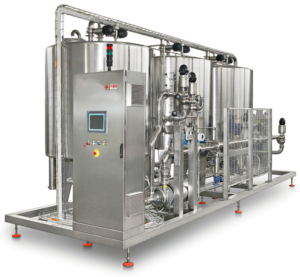
Modernisation of a CIP station in a dairy. In this project a damaged Siemens OP177a panel was replaced with a Xinje TG765-ET while the S7-300 controller stayed unchanged; the conditions were an Ethernet port (-ET version) and PROFINET communication with the controller. The screens were recreated in full, and scripts in C allowed an additional washing programme, with settings stored in the panel memory, to be added without changing the PLC program. According to the description the project took under a week from the order, the operators needed no training, and the saving relative to an original Siemens panel was in the region of 70%.

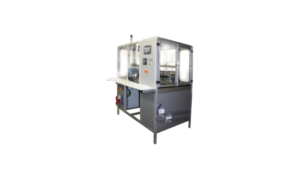
Semi-automatic machine for assembling shaver heads. The machine combines a TG panel (visualisation, recipes, parameter logging to a CSV file) with a DS2 servo drive that rotates the table carrying the parts; according to the project description this gives positioning accuracy to tenths of a millimetre. The DS2 works with an incremental encoder, so the axis needs homing after switch-on; the drive is configured with four buttons and has configurable inputs and outputs for signals to the controller. The threefold increase in output and the absence of rejects are the result of the whole machine, including the check for the presence of components, not of the servo alone. Newer-generation servo drives are available in the shop.
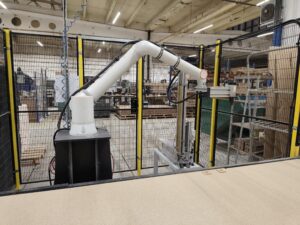
Three-axis CNC milling machine for aluminium muntins. In the machine described in this project the axes are driven by DS5 servo drives and the 2 kW spindle by an inverter; the CNC control is our own. This matches the criterion from the drive selection article: a positioned axis is run by a servo drive, a spindle whose speed is set but not positioned by an inverter. The machine processes profiles 25–60 mm wide and 250–2500 mm long with an accuracy of tenths of a millimetre.
Cases in which Xinje is not the right choice
Xinje components are not the right choice when an end-user requirement, an existing system or a safety function cannot be met without a compromise. Four situations call for separate assessment:
- an end-user requirement as to brand – an in-house specification, standardised spare parts or a service agreement with another manufacturer; where justified, it takes precedence over the technical assessment;
- integration with an existing system from another manufacturer – the shop states that DS5 drives do not support MECHATROLINK-III or DMCNET, so the controller has to be changed or the drive moved to pulses or EtherCAT, which changes the scope of the retrofit; PROFINET is available only in the DS5P, and visualisation projects from other manufacturers are recreated from scratch;
- drive safety functions – STO is available only in DS5C2 variants with the -FS suffix; the other subfunctions (SS1, SLS, SBC) are not attributed to any drive without confirmation in the documentation of the specific variant. The PLr is set by the risk assessment and has to be achieved by the whole function, not by the drive alone; STO does not disconnect the voltage, and replacing a contactor is acceptable only if the whole function has the required PLr (EN 61800-5-2, EN ISO 13849-1);
- requirements outside the series range – a capacitive screen (TS panels are resistive), an SD card slot (the TS has none), single-phase supply for a higher-power inverter (the VH6 runs only from 3×400 V) or a power rating outside the shop range.
In such cases selection follows the requirements, not the brand. The company’s projects also include other manufacturers’ components, such as the Siemens controller retained in the CIP station. Work on existing machines: machine retrofit.
Frequently asked questions
Can Xinje components be used to retrofit a machine with another manufacturer’s controller?
Yes, provided the interfaces are compatible: the panels have Modbus RTU and Modbus TCP drivers, and in the project above a TG panel communicated with an S7-300 over PROFINET. Before ordering, the protocol, the cut-out and the possibility of recreating the visualisation are checked against the documentation of the specific models.
How is a Xinje inverter connected to a PLC?
Over Modbus RTU on RS485 or through digital and analogue inputs; the VH1 has RS485, and the VH6 has it in versions with a communication card. EtherCAT is available only in the VH6 with a card. A Modbus RTU line has one master.
When is a pulse input on a servo drive enough, and when is EtherCAT needed?
A pulse input (DS5L2, DS5K2) is enough for single axes if the controller’s pulse outputs reach the required frequency. EtherCAT (DS5C2) is justified by multi-axis machines, interpolation and electronic cams, and requires an EtherCAT controller.
Does every DS5 drive have the STO function?
No. STO is available only in DS5C2 variants with the -FS suffix. Other safety functions are not attributed without confirmation in the documentation of the variant, and the required PLr results from the risk assessment of the whole function.
Does running the xinje.pl shop influence the choice of components?
The shop belongs to Automation, which is disclosed. Selection is based on interfaces, functions, installation constraints and end-user requirements; where another manufacturer’s solution meets them better, the assessment says so.
A quotation for your retrofit or machine
If you are planning to retrofit a machine or build a new one and are not sure whether Xinje components will meet the requirements – describe the system to us: controller and network, motors and drives, panel, and your company’s requirements as to brand and safety. We visit, inspect the machine and its documentation, and within 48 hours of the visit send a preliminary quotation with the scope of work and the reasoning behind the selection – including another manufacturer’s solution where that is the right one. The visit and the preliminary assessment are free of charge and without obligation.
Call +48 796 019 414, write to biuro@automation.net.pl or fill in the contact form. We have been in business since 2014 and carry out projects throughout Poland.